Here we explain the different types of Raid Drives
RAID 0, RAID 1, RAID 5, RAID 10 Explained with Diagrams
RAID stands for Redundant Array of Inexpensive (Independent) Disks.
On most situations you will be using one of the following four levels of RAIDs. In practice with today’s larger drives, you may also consider RAID 6 for added fault tolerance depending on workload and capacity needs.
- RAID 0
- RAID 1
- RAID 5
- RAID 10 (also known as RAID 1+0)
This article explains the main difference between these raid levels along with an easy to understand diagram, and includes brief notes relevant to SSD/NVMe behavior.
In all the diagrams mentioned below:
- A, B, C, D, E and F – represents blocks
- p1, p2, and p3 – represents parity
RAID LEVEL 0
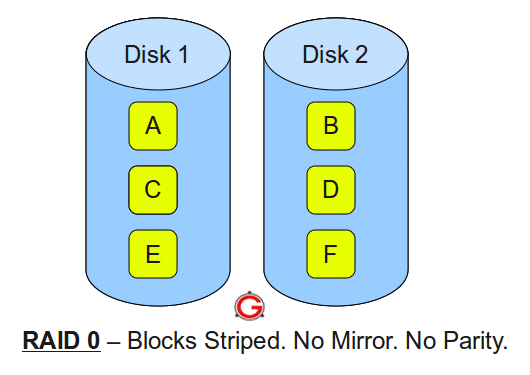
Following are the key points to remember for RAID level 0.
- Minimum 2 disks.
- Excellent performance (as blocks are striped); especially fast with SSD/NVMe, but parity-free striping also means higher write amplification on flash compared to mirrored writes.
- No redundancy (no mirror, no parity).
- Don’t use this for any critical system.
RAID LEVEL 1
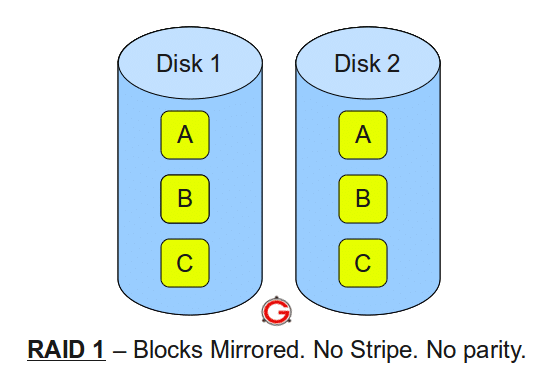
Following are the key points to remember for RAID level 1.
- Minimum 2 disks.
- Good performance (no striping, no parity); reads can be served from either disk, while writes typically match single-disk speed.
- Excellent redundancy (as blocks are mirrored). For SSD/NVMe, ensure the controller/OS supports TRIM/UNMAP to maintain performance and longevity.
RAID LEVEL 5
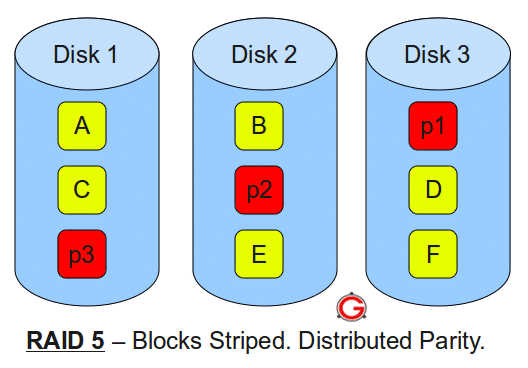
Following are the key points to remember for RAID level 5.
- Minimum 3 disks.
- Good performance (as blocks are striped).
- Good redundancy (distributed parity).
- Suitable for read‑heavy, non‑critical workloads with smaller disk counts. On modern large HDD/SSD/NVMe, rebuilds take longer and the risk of encountering an unrecoverable read error is higher. For production arrays, consider RAID 6 (dual parity; usable capacity is approximately N−2 drives) for better resilience. Databases typically perform and recover better on RAID 10 for write‑heavy needs, or RAID 6 when capacity and fault tolerance are priorities. Note that parity writes have a penalty; a controller with cache helps but writes remain slower than RAID 10, and write amplification can be higher on SSDs.
RAID LEVEL 10
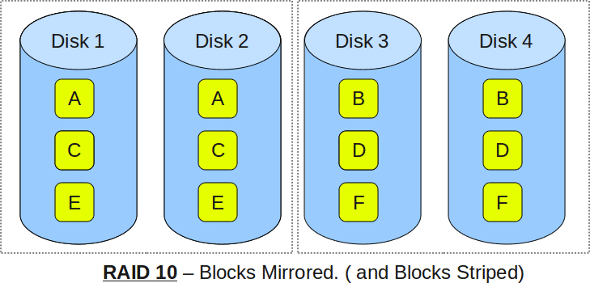
Following are the key points to remember for RAID level 10.
- Minimum 4 disks.
- This is also called as “stripe of mirrors”
- Excellent redundancy (as blocks are mirrored)
- Excellent performance (as blocks are striped)
- If you can afford the dollar, this is the BEST option for any mission critical applications (especially databases). With SSD/NVMe, RAID 10 minimizes parity overhead, reduces rebuild windows, and delivers strong, predictable write performance compared to parity arrays.