 What you need to know about SSL Certificates:
Does the idea of improving your search engine rankings and offering your visitors better security sound like something you’re interested in?
-
Great news: you can secure your site affordably, and many hosting plans even include free automated certificates.
-
HTTPS protects your visitors by encrypting data in transit and is a best practice across the web.
-
You get all the benefits of a properly configured HTTPS site without breaking the bank.
Why should I get SSL?
- Google Chrome holds the largest global browser market share, so how it flags security matters for your visitors.
- Google treats HTTPS as a lightweight ranking signal. Use HTTPS first and foremost for security and user trust; any SEO lift is a bonus.
- Modern Chrome clearly labels HTTP pages as Not secure and uses a neutral security icon for HTTPS, making your site’s security state obvious to visitors.
What is a SSL Certificate?
Have you ever noticed how sometimes websites start with “http://” and then sometimes they start with “https://”? If you have, you’ve seen the end result of an SSL certificate. Today, HTTPS connections use Transport Layer Security (TLS), the modern successor to SSL. The industry still says “SSL certificate,” but your browser actually negotiates TLS (typically TLS 1.2 or TLS 1.3) to encrypt the connection. 
- Certificates help your browser verify it’s talking to the right server and then establish an encrypted link so data remains private and secure.
- With an unsecured HTTP connection, third-parties can snoop on traffic between your visitor’s browser and your web server, which is a serious risk for any data in transit.
- Best practice is to use HTTPS for all pages and assets, not just checkout or login screens, to eliminate mixed content and provide site‑wide protection.
Why Do You Need an SSL Certificate?
The internet is a noisy place, and users expect privacy and authenticity by default. Modern versions of Google Chrome de‑emphasize old padlock visuals and instead use a neutral security icon for HTTPS connections and a clear Not secure label for HTTP. While HTTPS may offer a modest SEO signal, the real win is protecting your visitors and maintaining trust across your entire site.
If your website is not secure, and does NOT have an SSL Certificate this is what it looks like now:
You’ll see a Not secure indicator next to the address bar for HTTP pages. Browsers still display your site’s favicon; the security indicator is shown separately.
Clicking the indicator opens a panel explaining that the connection isn’t secure and advising against entering sensitive information. 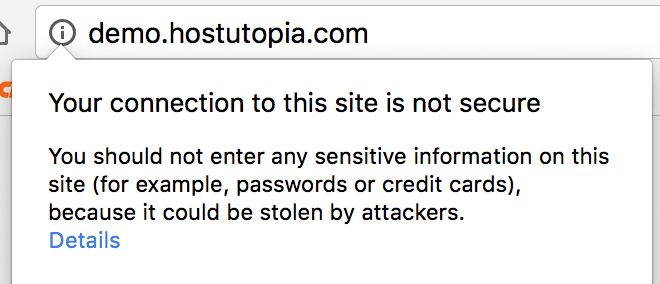
So, beyond encrypting your readers’ connection, you’re also aligning with browser security expectations and avoiding Not secure warnings that can hurt conversions and trust.
Are SSL Certificates Expensive?
There are a number of different SSL/TLS certificate types you can choose from. Each offers the same strong encryption; the difference is the level of identity validation and included features.
Standard SSL Certificates (see current pricing)
 Standard certificates are typically Domain Validation (DV). DV, Organization Validation (OV), and Extended Validation (EV) all provide modern TLS encryption. DV is suitable for blogs, small business sites, and many ecommerce implementations when compliance requirements are met. Choose OV/EV if you need higher identity assurance, additional vetting, or enterprise policy alignment.
GlobalSign Domain SSL Certificate (see current pricing)
GlobalSign DomainSSL is a DV option that includes vendor support and warranty coverage. Consider paid certificates when you need features like wildcard/SAN coverage, vendor warranties, or specific validation levels (OV/EV). Note that modern browsers no longer emphasize a green padlock; focus on correct HTTPS configuration and eliminating mixed content.
Using cPanel? AutoSSL can provision and auto‑renew free DV certificates (for example, via Let’s Encrypt) on many hosting plans, reducing cost and management overhead.
How to Get a SSL Certificate?
If you’re running a regular WordPress site and aren’t handling highly regulated data, you can secure your site in minutes. Many plans include AutoSSL for a free DV certificate, or you can purchase a paid certificate if you need OV/EV, wildcard/SAN support, warranties, or hands‑on assistance.
- Order StandardSSL Cert
Wrapping Things Up
Because browsers and Google are pushing HTTPS everywhere, it’s no longer optional. The primary benefit is protecting your visitors and your brand. Any SEO benefit is incremental, but avoiding Not secure warnings can meaningfully improve trust and conversions. With automated options like AutoSSL and a range of paid certificates, there’s a straightforward path to securing your site end‑to‑end.